¶ Overview
When a cat is caught, the bot randomly picks a new time according to the channel's timing settings. The bot then saves this target time to the database and creates a task which waits until that time hits to spawn another cat.
When the time comes, the bot randomly picks a cat type (based on the spawn chances) and sends it to the channel. If it fails due to missing permissions or deleted channel it will unsetup the channel to prevent further errors.
It will choose the default if there is no custom spawn message.
¶ Spawn and Caught Messages
The default spawn message looks like this:
{emoji} {type} cat has appeared! Type "cat" to catch it!
The default catch message looks like this for most cats:
{username} cought {emoji} {type} cat!!!!1!
You now have {number} cats of dat type!!!
this fella was cought in {time}!!!!
Default special catch messages are listed here:
| Icon | Cat Type | Special Caught Messages |
|---|---|---|
 |
Sus |  |
 |
Rickroll |  |
 |
Reverse |  |
 |
8bit | 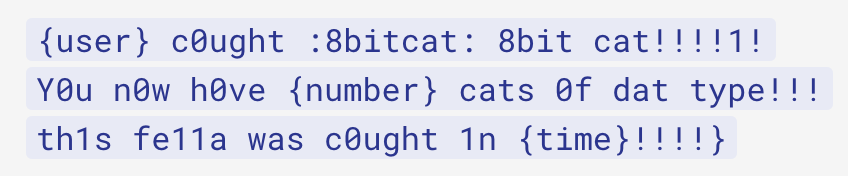 |
 |
Corrupt |  |
 |
Professor |  |
 |
eGirl |  |
¶ Late Catches
When the first 3 people catch cats too late (up to 5 seconds after initial catch but can be interrupted by next spawn), they will still get the cat, although without any boosts (prisms, catnip, and blessings), but the progress of bounties, quests, or the tutorial will still happen.
The message looks like this:
:pointlaugh: Late {emoji} {type} catchers:
{username} ({extra time}, {number} total)
(upper repeated up to 3 times)
-# up to 3 late catchers within 1s get +1 cat without boosts
¶ Bonus Cats
See Cat Types.
¶ Rains
Starting a rain pauses the normal spawn cycle and forcibly spawns cats randomly every 2.5-3 seconds.
There is a set amount of cats spawned in each rain, calculated as rain duration in minutes * 22.
¶ Restarts
When Cat Bot finishes starting up, it goes through every channel in which the target time is in and spawns a cat in them. This covers spawns which should have occurred during the restart.
Additionally, every 5 minutes, a loop is run to check for any channels which are past due, either due to their tasks getting killed by the restart or something going wrong somewhere in the process.
Cat Bot keeps track of active channels to ensure that no duplicate spawns occur, maintaining a smooth and balanced spawning cycle across servers.
It also logs spawn and catch events to improve performance tracking and help identify any bugs or timing issues.
This loop also handles saving cookies, updating status, posting stats to Top.gg, sending vote, quest, and timed reminders, as well as database backups.
¶ Related Commands
/setup, as well as setting up the bot, spawns the first cat to bootstrap the above infinite loop.
/forget makes the bot forget about any spawned cats as well as marks the channel as unsetup to prevent any ongoing spawns.
/forcespawn forces a cat to spawn, overriding any ongoing spawn tasks.
Due to how spawning works, /changetimings will only take effect after the next catch.
Spawn and catch messages can be modified with the /changemessage command.
¶ Spawning Troubleshooting
- Make sure you ran the
/setupcommand in the channel where you want cats to appear. - Do
/forgetand then/setupagain in the channel where you want cats to spawn. - Try using
/forcespawnto force the cat to spawn. - Try saying "cat". There might just be a cat in the channel, even if there is no appear message.
- If everything fails, join our support server and open a ticket, the moderation team will help you.
¶ Catching
Here is a brief overview of what happens when you send cat:
- Check if:
- There isn't a cat
- User is in
/preventcatchmode - User attempted to double catch with anti-double catch setting enabled.
- If any of the above is true, react with :pointlaugh:.
- Complete belated quests, if needed.
-
Pick next spawn time
- If there are more than 5 normal spawns in that second and it is a normal spawn, shift the time from -11 to 11 seconds to prevent hitting global ratelimits.
This is done early so if something goes wrong during the catch, the spawn shouldn't be affected.
- If there are more than 5 normal spawns in that second and it is a normal spawn, shift the time from -11 to 11 seconds to prevent hitting global ratelimits.
-
Calculate catch time
- Taken from message ID.
- Discord provides time in unix millis, so the time is accurate up to 3 decimal places.
However, only up to 2 are shown unless the time is under 1 second.
-
Determine cat type (for cats which spawned before February 11, 2025 and weren't caught yet).
- This is done by scanning for emoji name (e.g. :finecat:) inside the message. This is the reason the cat emoji names are blacklisted from
/changemessage.- If failed, e.g. if the user deleted the spawn message, say "oopsie poopsie, i cant access the original message but [user] did catch a cat rn" and end early.
- Cat types after Feb 11, 2025 are stored in the database to remove the need of fetching original spawn message. However, cat emoji names are still blacklisted.
- This is done by scanning for emoji name (e.g. :finecat:) inside the message. This is the reason the cat emoji names are blacklisted from
-
Calculate the prism boost chance.
- This includes starting a new rain or extending it by 10 minutes if an eGirl cat got boosted.
-
Handle powerups such as blessings and catnip.
-
Randomly advertise Cat Rains (1/8) with "☔ get tons of cats and have fun:
/rain" (changes during sales)- Because of the plush campaign, the ad chance is currently 1/6. There is also a special ad for the campaign, which replaces the one for rain: "📦
/plushlast chance (+badge!)"
- Because of the plush campaign, the ad chance is currently 1/6. There is also a special ad for the campaign, which replaces the one for rain: "📦
-
Randomly show a fun fact/hint about itself (1/20). For example, it may say "View all cats and rarities with /catalogue".
- 1/1,000 to 1/10,000,000,000 chance - add a message that says "this appears in x% of catches." and give Lucky achievement.
-
Do tutorial if haven't completed yet:
- Haven't started tutorial - Reply with "👋 Welcome to Cat Bot! Check out the
/tutorialto get started (includes a free gift!)" - Told to catch for tutorial - Reply with "✅ Run
/tutorialto continue" - Else - "👋 Check out the
/tutorial(includes a free gift!)"
- Haven't started tutorial - Reply with "👋 Welcome to Cat Bot! Check out the
-
Choose either the channel's custom catch message or a cat themed one (if any).
Note: Custom catch messages take priority.
-
Choose a button to attach.
- 1/11 chance with 50 or more cats in the inventory - a "You see a shadow..." button appears.
- Didn't vote - Vote button, which show any one of 19 different (usually silly) messages linking to cat bot's top.gg page.
- 1/21 "Join our Discord!"
- 1/501 - "John Discord 🤠"
- 1/50001 - "DAVE DISCORD 😀💀⚠️🥺"
- 1/5000001 - "JOHN AND DAVE HAD A SON 💀🤠😀⚠️🥺"
The last four buttons above all link to Cat Stand, the support server.
- Otherwise: don't attach a button.
The vote button can say:
- You havent voted today!
- I know you haven't voted

- If vote cat will you friend

- Vote cat for president
- vote = 0.01% to escape basement
- vote vote vote vote vote
- mrrp mrrow go and vote now
- if you vote you'll be free (no)
- vote. btw, i have a pipebomb
- No votes? :megamind:
- Cat says you should vote
- cat will be happy if you vote
- VOTE NOW!!!!!
- I voted and got 1000000$
- I voted and found a gf
- lebron james forgot to vote
- vote if you like cats
- vote if cats > dogs
- you should vote for cat NOW!
- I'd vote if I were you
- Voting only takes 30s :3
- uwu pls vote~~
- Why haven't you voted yet

- Stay hydrated! and vote too
- btw, voting is free
- Cats are cute, voting is too
- Simultaneously do the following:
- Add the cats to the user.
- Send the catch result message.
- Delete the spawn message.
-
If needed, does the following in order:
- Set fastest and slowest personal bests.
- Give out achievements.
- Complete quests.
- Complete mafia bounties.
- Do event objective, if needed.
-
Detect if a rain ended unexpectedly (it might take a couple catches as the check is only run a bit after the rain should have normally ended).
- If so, restart it and add 3 cats to it as compensation.
-
Sleep until the next decided spawn time.
-
Spawn a cat, and repeat.
¶ Trivia
- There was a special message added on April 29th 2025 for a 0 second catch: "this fella was cought in 0.000 seconds (woah)".
- The rain check system was added on August 11th 2025.
- The "should end" formula is calculated like this:
floor(rain time + 600 * 1.3)fromfloor(rain time + 600 * 1.2)since August 24th 2025. - Catching was optimized on October 27th 2025 and updated on June 26th 2026.